With Belvo's Loan Imports feature, you can upload your loan portfolios directly in the Direct Debit Portal. You upload a CSV describing your loans and their customers, and Belvo then creates the customers, registers their payment methods, and applies your collection strategy to generate the payment requests.
This is the no-code counterpart to Register and Track Loan Portfolios (API).
Before any funds are collected, you must:
- Obtain explicit consent from your users, authorizing you to debit funds from their accounts.
- Maintain documented evidence of this consent.
You can do this by uploading consents in bulk with our Bulk Consent Uploads feature, or programmatically with our Consent API.
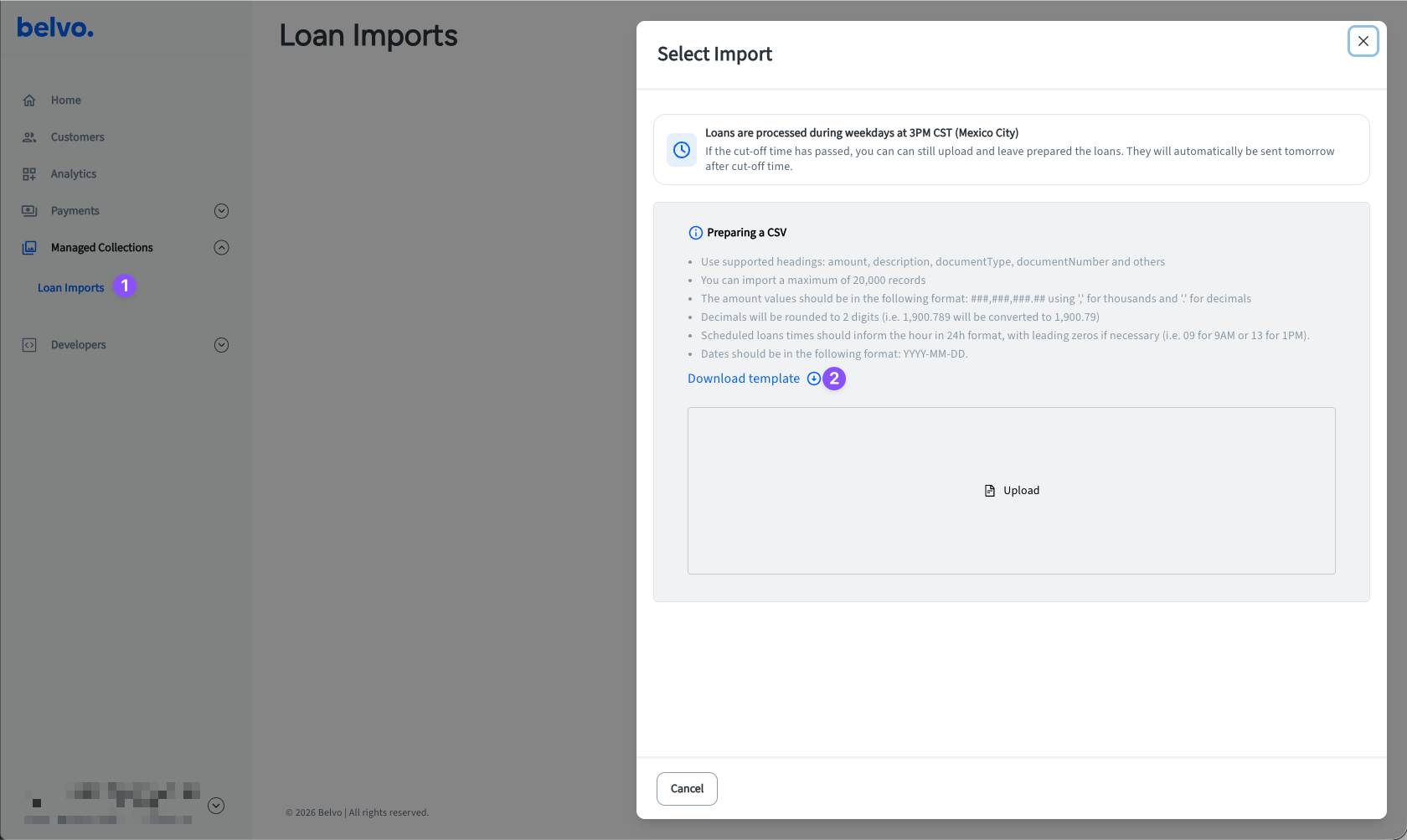
In your Direct Debit Portal, go to Managed Collections → Loan Imports (Sandbox | Production).
Download the
.xlsxworkbook template linked on that screen. TheDescripcionessheet describes all 28 columns, which ones are required, and the workbook restrictsBanco,Tipo de IDandEstado del Creditoto their accepted values, so you cannot type an unsupported one by mistake.Always start from the current templateAlways download the template from the Loan Imports screen each time rather than reusing an old copy to avoid any issues regarding bank coverage or new required fields.
In the workbook, fill in the
MXNsheet.Save the
MXNsheet as a CSV. Please note:- The separator must be a comma. If you use semicolons (
;), the file will fail on upload. Please make sure that your CSV uses commas (,). - Save the
MXNsheet only. - Save the files as UTF-8 to ensure that it is compatible with our system.
- The separator must be a comma. If you use semicolons (
Name your CSV file so that it contains the collection date. See the Naming your file section for more details as incorrectly naming your file can lead to your customers being charged on an incorrect day.
Upload the CSV on the Loan Imports screen. Note: The platform only accepts CSV files.
Review the result. Rows we could not process are listed with the reason, and you can fix them and upload a corrected file.
Belvo reads the collection date from the file name. It looks for a date written as YYYY-MM-DD anywhere in the name, and that date becomes the day the loans in that file are collected. For example, all of these are collected on 15 September 2026:
Daily_MyCompany_2026-09-15_managed_collection.csv
cartera 2026-09-15.csv
2026-09-15-loans.csv
If you send more than one file for the same collection date, make sure to give each file a unique name and (optionally) also add a _ + digit to the end of the collection date. For example:
Client1-2026-09-15_0.csv
Client1-2026-09-15_1.csv
Client2-2026-09-15_0.csv
Client2-2026-09-15_1.csvIf the file name contains no date in YYYY-MM-DD format, Belvo uses the file's upload date in Mexico City (GMT-6) instead, without failing the upload. This will lead to your customer being charged on a date that you did not choose. As such, we highly recommend you always provide a collection date in the file name.
If the same Referencia Unica cliente (UID) appears more than once in a file, the entire file is rejected and nothing is collected from it. One repeated reference is enough.
When Belvo cannot process a row, the given row is skipped and no payment request is created for it. However, the rest of the file is still processed normally. You can correct the flagged/skipped rows and reupload the file.
Below are the most common reasons a row is skipped:
| Reason | What to do |
|---|---|
| The CLABE belongs to a bank Belvo does not support for Direct Debit | Nothing, on your side. This is coverage Belvo does not have, so the row cannot be collected regardless of how the file is written. Check the accepted banks in the template's bank list, and see Institutions. |
| The same customer reference appears twice | Send one row per customer per collection date. Note: This error invalidates the entire file, not just the given row. |
| A name or surname contains something other than letters | Remove digits, punctuation and symbols. Accented characters and ñ are accepted. |
The phone number is not +52 followed by exactly 10 digits | Write the number as +52 plus the 10-digit national number, with no spaces or dashes. |
A date is not written as YYYY-MM-DD | Use YYYY-MM-DD. This is the only format accepted, and spreadsheets often store dates as numbers, so check what was actually written to the CSV. |
Tipo de ID is not mx_rfc or mx_curp | Use one of those two values, and make sure the document number matches the type: 18 characters for a CURP, 12 or 13 for an RFC. |
Estado del Credito is not an accepted status | Use past_due, restructured, canceled or in_arrears. |
| The account number is the wrong length | A CLABE has 18 digits. A card number has 13 to 16. For a card, Banco must also be filled in with a bank identifier. |