A consent link lets you collect a direct debit authorization without building your own UI. You create the link with one API call and send the URL to your customer. Your customer opens it in their browser, enters their CLABE, reviews and accepts the direct debit authorization, and signs it electronically with a code that Belvo deposits into their account.
When your customer finishes, Belvo has created a payment method and a confirmed consent for them. They are the same resources that you would otherwise create yourself with the Direct Debit API, so you can send payment requests right away.
In this guide, you will:
- Create a consent link for an existing customer, with the payment terms that they must authorize.
- Share the link with your customer and see what they do in the consent link widget.
- Handle the redirect back to your application.
- Listen for webhooks and confirm the result.
A consent link replaces the Create a payment method and Create a consent steps of the Direct Debit Payments via API guide. You still create the customer with the API, and you still create payment requests with the API.
Before you begin, make sure you:
- Generate your API keys.
- Set up a webhook to listen to events.
- Set up IP Whitelisting.
- Ask your Belvo representative to enable consent links for your account. Consent links use penny validation to deliver the signature code, so penny validation consent must be active for your account.
- Create a customer for the person you want to debit. The widget shows the customer's name and a masked RFC or CURP from this record, so make sure that the data is correct.
To create a consent link, make a POST /consents/links call with the ID of the customer and the payment terms that they must authorize.
curl -i -X POST \
  'https://api.sandbox.directdebit.belvo.com/consents/links' \
  -H 'Content-Type: application/json' \
  -H 'api-key-id: YOUR_API_KEY_ID' \
  -H 'api-key-secret: YOUR_API_KEY_SECRET' \
  -d '{
    "customerId": "0d1a377b-b4c5-4a94-9e2e-83e59d1f6a9c",
    "expiresIn": 72,
    "callbackUrl": "https://www.your-app.com/direct-debit/return",
    "terms": {
      "chargeType": "RECURRING",
      "chargeAmount": 420.00,
      "paymentFrequency": "MONTHLY",
      "serviceOrCreditDescription": "Préstamo personal",
      "termDescription": "12 meses",
      "interestRate": "1,0% mensual",
      "numberOfCharges": 12,
      "firstChargeDate": "2026-11-10",
      "isPayrollLinked": false
    }
}'| Parameter | Type | Required | Description |
|---|---|---|---|
customerId | string (UUID) | true | The customerId of the customer who must authorize the direct debit. The customer must belong to your account. |
terms | object | false | The payment terms that your customer reviews and authorizes in the widget. For details, see the Terms object table below. |
expiresIn | integer | false | The number of hours until the link expires. Minimum 1, maximum 720 (30 days). Default: 72. |
callbackUrl | string | false | The URL that the widget sends your customer back to when they finish or leave the flow. Belvo adds the outcome as query parameters. The URL must use https, must not contain credentials, and can have at most 2048 characters. You can only set it when you create the link. For details, see Handle the redirect to your callback URL. |
All terms are optional. The widget only shows the terms that you send, so send every term that applies to the agreement with your customer.
Send chargeAmount as a JSON number (for example, 420.00), not as a string. Belvo rejects pre-formatted values such as "$420.00 MXN" or "420.00". The amount is always in Mexican pesos (MXN), and Belvo formats it for your customer.
Send chargeType and paymentFrequency in uppercase (for example, RECURRING and MONTHLY). Belvo rejects lowercase values.
| Parameter | Type | Description |
|---|---|---|
| string (enum) | The type of charge that your customer authorizes. Can be one of:
For |
chargeAmount | number | The amount of each charge, in MXN. Must be at least 1. Belvo rounds it to two decimals. For example, 1234.5 is shown to your customer as "$1,234.50 MXN". |
paymentFrequency | string (enum) | How often you charge your customer. Can be one of: MONTHLY (shown as "Mensual"), BIWEEKLY (shown as "Quincenal"), or WEEKLY (shown as "Semanal"). |
serviceOrCreditDescription | string | A description of the service or credit, in Spanish. For example, Préstamo personal. |
termDescription | string | A description of the term of the agreement, in Spanish. For example, 12 meses. |
interestRate | string | The interest rate, formatted as you want your customer to read it. For example, 1,0% mensual. |
numberOfCharges | integer | The total number of charges. Must be at least 1. |
firstChargeDate | string | The date of the first charge, in YYYY-MM-DD format. For example, 2026-11-10. |
isPayrollLinked | boolean | Indicates whether the credit is linked to your customer's payroll. |
Your customer can only open the full direct debit contract (Revisar contrato de domiciliación) when the link has a chargeAmount, and also a paymentFrequency for RECURRING charges. Make sure to send these terms.
You will receive the following response from our API. Make sure to save the id to check the status of the link later, and send the consentLinkUrl to your customer.
{
  "id": "b8e1c2f4-5a6d-4e7f-8a9b-0c1d2e3f4a5b",
  "consentLinkUrl": "https://portal.sandbox.directdebit.belvo.com/consent.html?token=aB3dE6fG9hJ2kL5mN8pQ1rS4",
  "status": "active",
  "step": "bank_account",
  "customerId": "0d1a377b-b4c5-4a94-9e2e-83e59d1f6a9c",
  "terms": {
    "chargeType": "RECURRING",
    "chargeAmount": 420,
    "paymentFrequency": "MONTHLY",
    "serviceOrCreditDescription": "Préstamo personal",
    "termDescription": "12 meses",
    "interestRate": "1,0% mensual",
    "numberOfCharges": 12,
    "firstChargeDate": "2026-11-10",
    "isPayrollLinked": false
  },
  "expiresAt": "2026-10-03T15:00:00.000Z",
  "callbackUrl": "https://www.your-app.com/direct-debit/return"
}| Parameter | Type | Description |
|---|---|---|
id | string (UUID) | The Belvo ID of the consent link. |
consentLinkUrl | string | The URL that you send to your customer. |
status | string | The status of the link. For the possible values, see Consent link statuses. |
step | string | The screen your customer is on while the link is active. For the possible values, see Consent link steps. |
customerId | string (UUID) | The customerId that the link belongs to. |
terms | object | The terms, exactly as you sent them. |
expiresAt | string | The ISO-8601 timestamp when the link expires. |
completedAt | string | The ISO-8601 timestamp when your customer completed the link. Only present for completed links. |
callbackUrl | string | The callback URL, if you set one. |
Send the consentLinkUrl to your customer by SMS, email, or WhatsApp, or redirect them to it from your application. The widget works in any mobile or desktop browser, is in Spanish, and doesn't require your customer to log in.
Anyone with the consentLinkUrl can open the widget for your customer. Only send it to your customer, and don't log it or add it to analytics tools. If you think that a link was shared with the wrong person, revoke it and create a new one. See Manage consent links.
Your customer goes through the following screens. The widget saves their progress, so if they close the page and open the link again before it expires, they continue on the same screen.
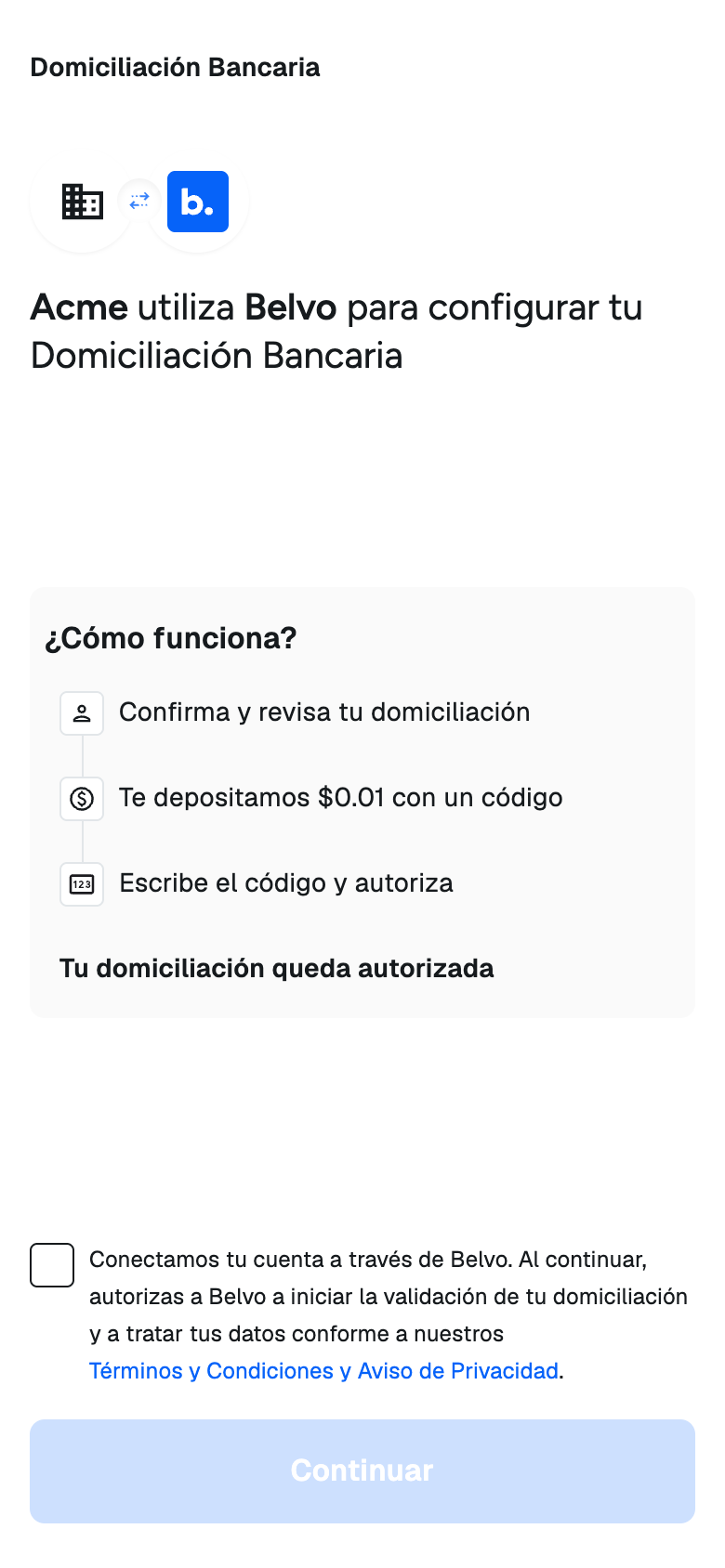
The welcome screen explains how the process works:
- Your customer confirms and reviews the direct debit.
- Belvo deposits $0.01 MXN into their account, with a code.
- Your customer enters the code to authorize the direct debit.
To continue, your customer must accept Belvo's Terms and Conditions and Privacy Notice.
If you set a callbackUrl, a back arrow lets your customer leave the flow. Belvo redirects them to your callbackUrl with status=cancelled&error=user_cancelled.
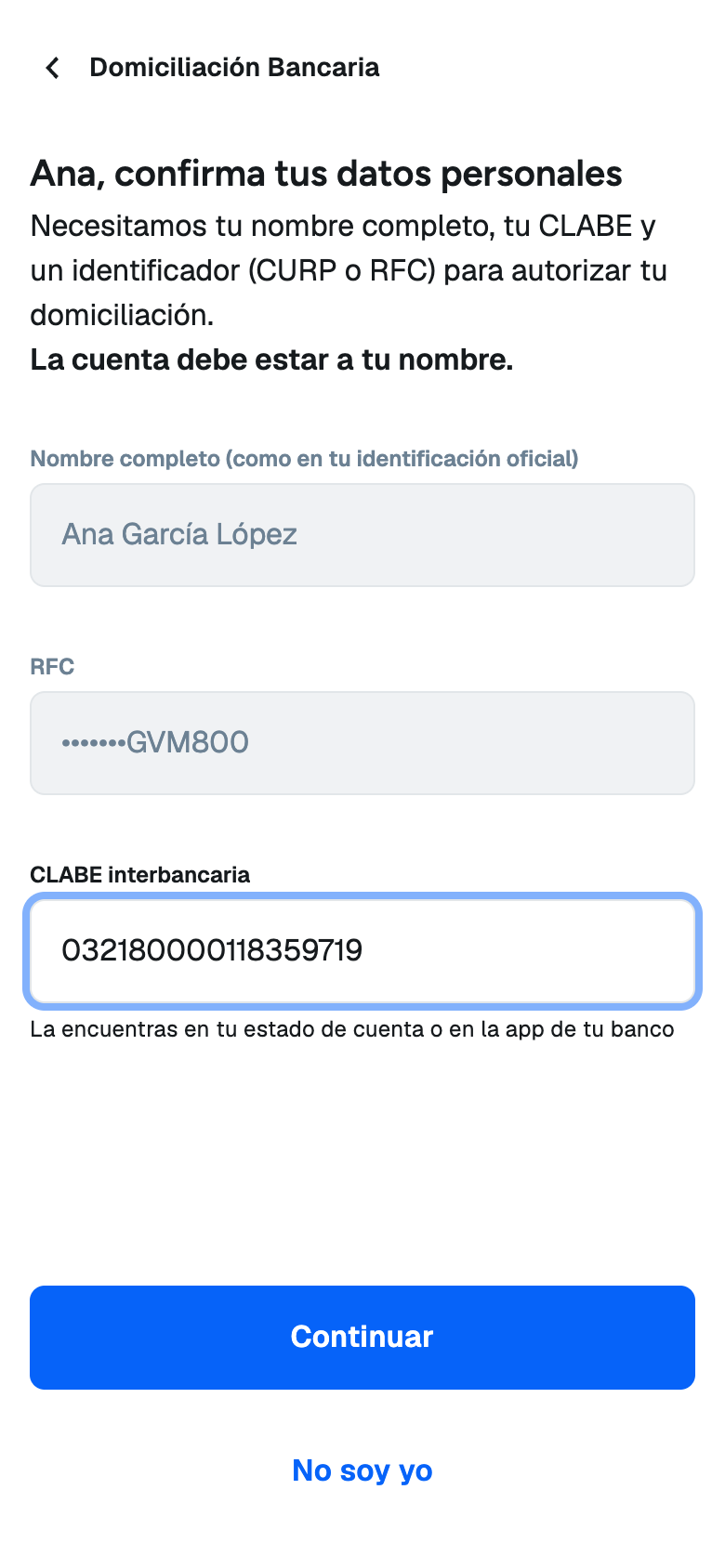
The widget shows your customer's full name and masked RFC or CURP from the customer record. Your customer can't edit these values.
Your customer enters their 18-digit CLABE. The widget checks that the CLABE is valid, and Belvo identifies the bank from it. The account must be in your customer's name. Consent links only accept CLABE accounts, not debit cards.
When your customer taps Continuar, Belvo creates the payment method and immediately sends the $0.01 MXN deposit with the code.
If the name or ID is wrong, your customer can tap No soy yo and then Salir sin autorizar. Belvo redirects them to your callbackUrl with status=cancelled&error=customer_data_mismatch. Correct the customer data and create a new link.
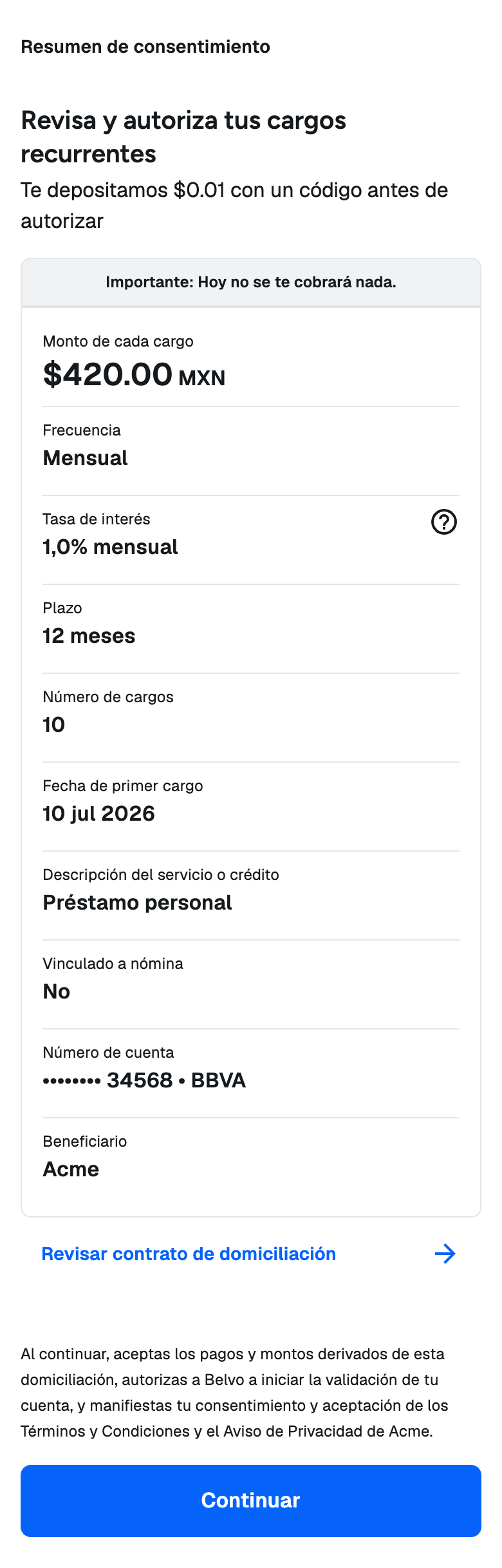
The widget shows a summary of the terms that you sent, together with the masked account number, the bank, and your business name as the beneficiary. It also tells your customer that nothing is charged today.
For RECURRING charges, the title reads "Revisa y autoriza tus cargos recurrentes". For SINGLE charges, it reads "Revisa y autoriza tu cargo único". The summary only has a row for each term that you sent.
When your customer taps Continuar, they accept the authorization. Belvo seals the authorization document and stores it as the consent's contract file.
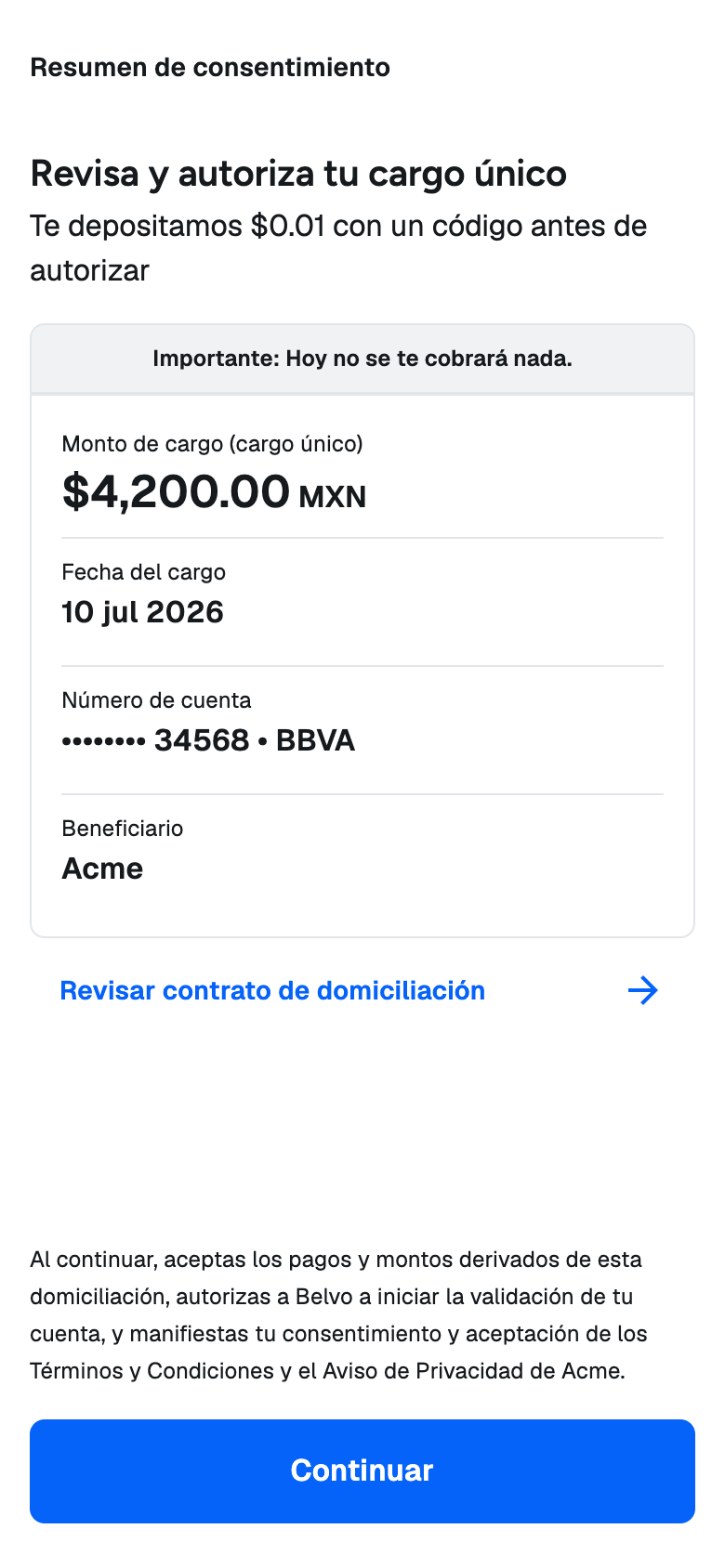
Single charge
This example link has "chargeType": "SINGLE" and only sends chargeAmount and firstChargeDate, so the summary shows the amount, the date of the charge, the account, and the beneficiary.
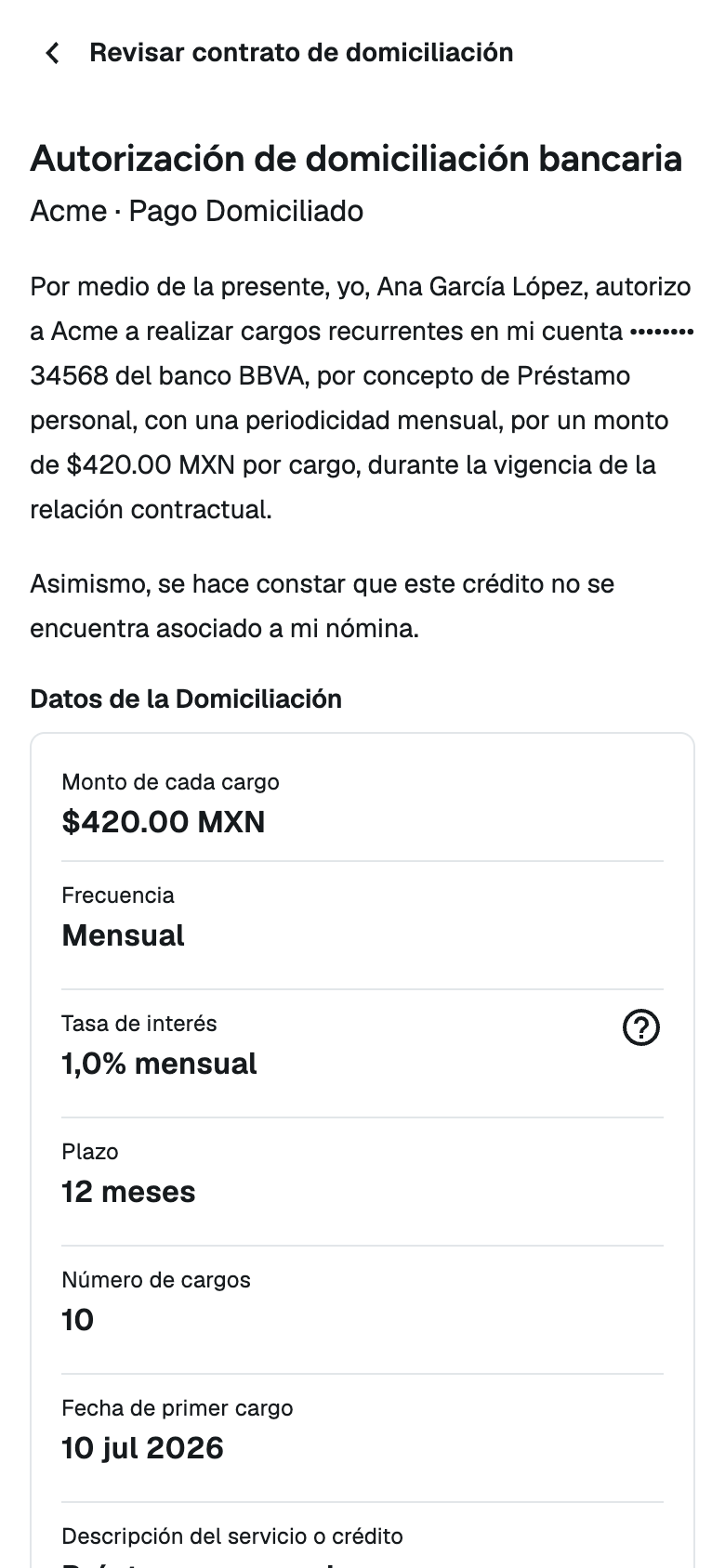
Contract review
With Revisar contrato de domiciliación, your customer reads the full direct debit contract, filled in with their data and your terms, and can download a PDF copy before they accept.
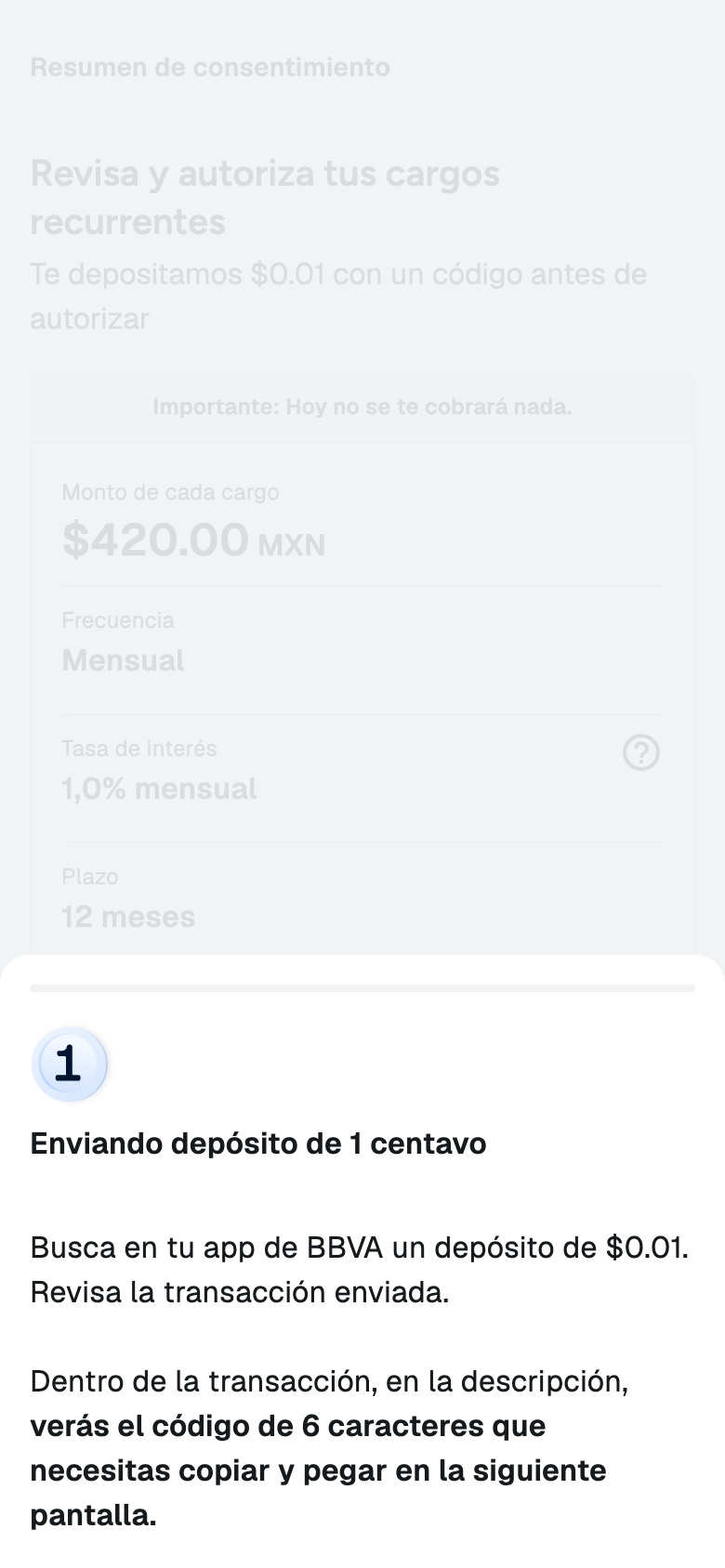
If the deposit hasn't arrived yet, the widget tells your customer to look for a $0.01 MXN deposit in their banking app. The code is in the description of the transaction.
The widget checks for the deposit automatically and moves to the next screen when it arrives. If the deposit already arrived while your customer was reviewing the authorization, the widget skips this screen.
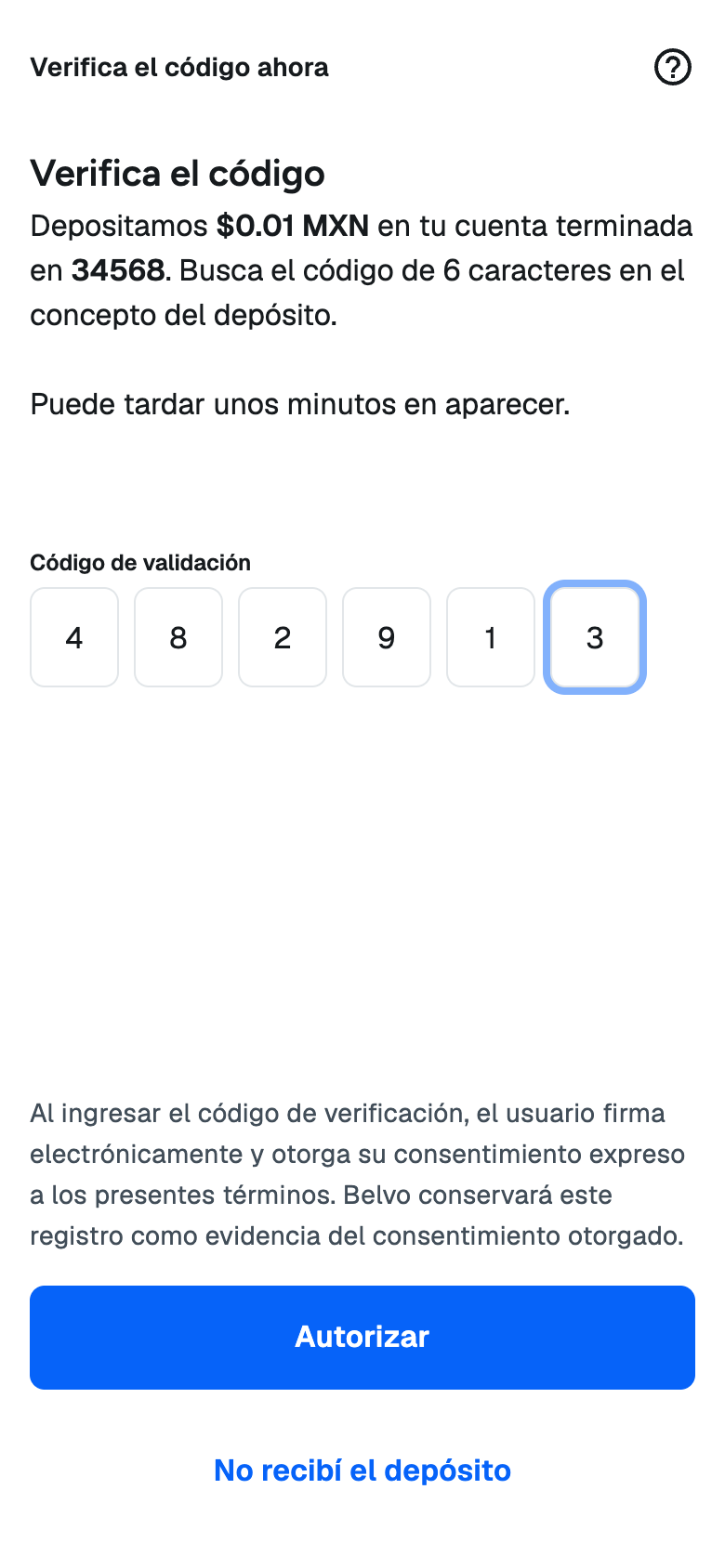
Your customer enters the 6-digit code from the description of the deposit and taps Autorizar. Entering the code is your customer's electronic signature of the authorization.
Your customer has 3 attempts to enter the correct code. If they can't find the deposit, No recibí el depósito explains where to find the code. If your customer entered the wrong CLABE, the deposit never arrives. They can end the flow from the same dialog, and you need to create a new link for them.
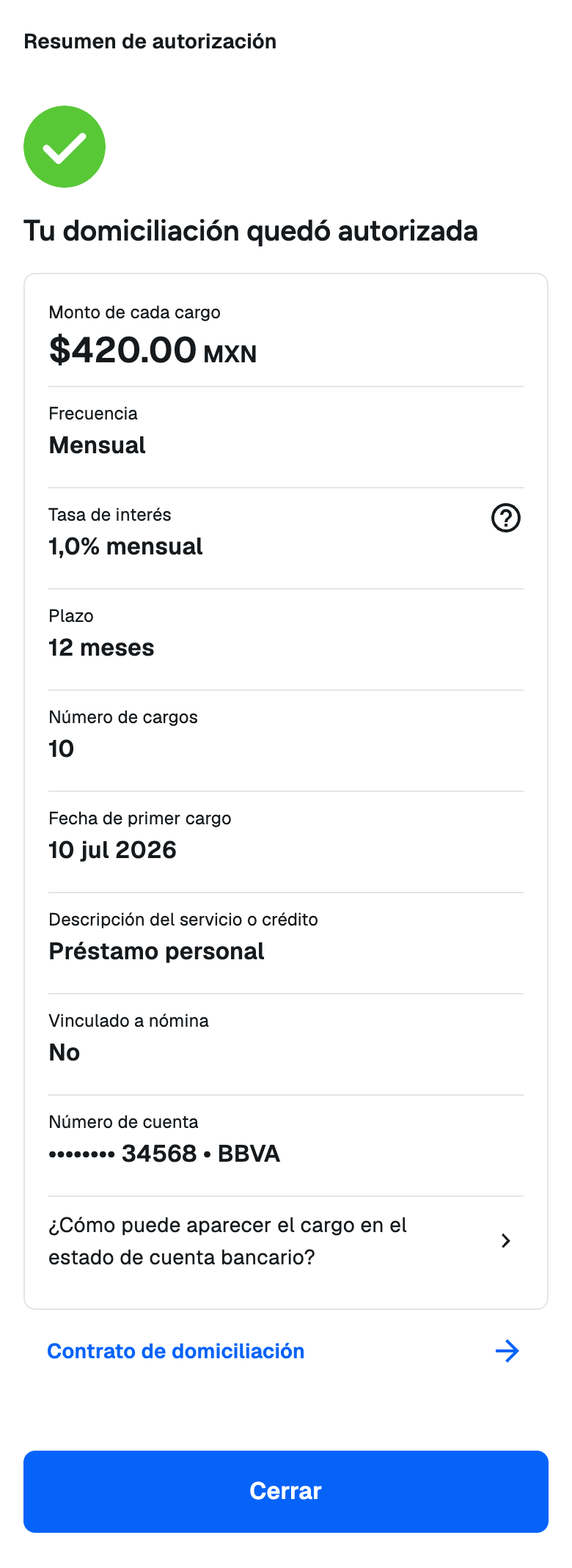
When the code is correct, the consent is confirmed and the link is completed. The widget shows a summary of the authorized terms.
When your customer taps Cerrar, Belvo redirects them to your callbackUrl with status=completed.
Signed contract
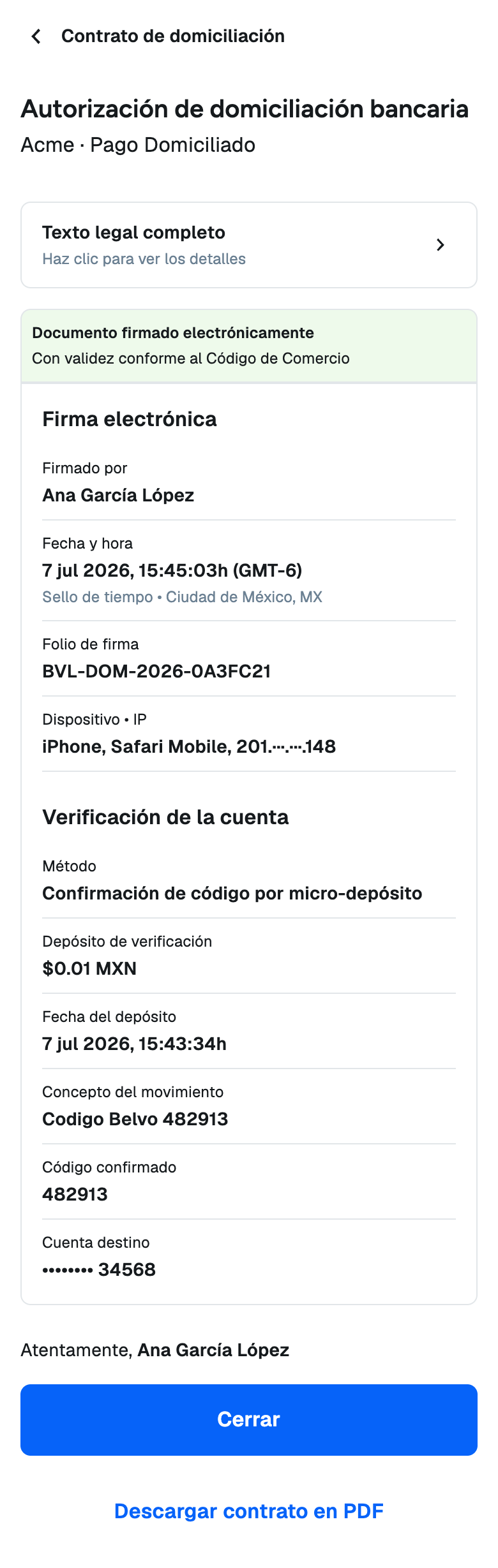
With Contrato de domiciliación, your customer sees the evidence of the electronic signature: the signature date and time (Mexico City time), the signature folio, the device, a masked IP address, and the details of the verification deposit. They can also download the signed contract as a PDF.
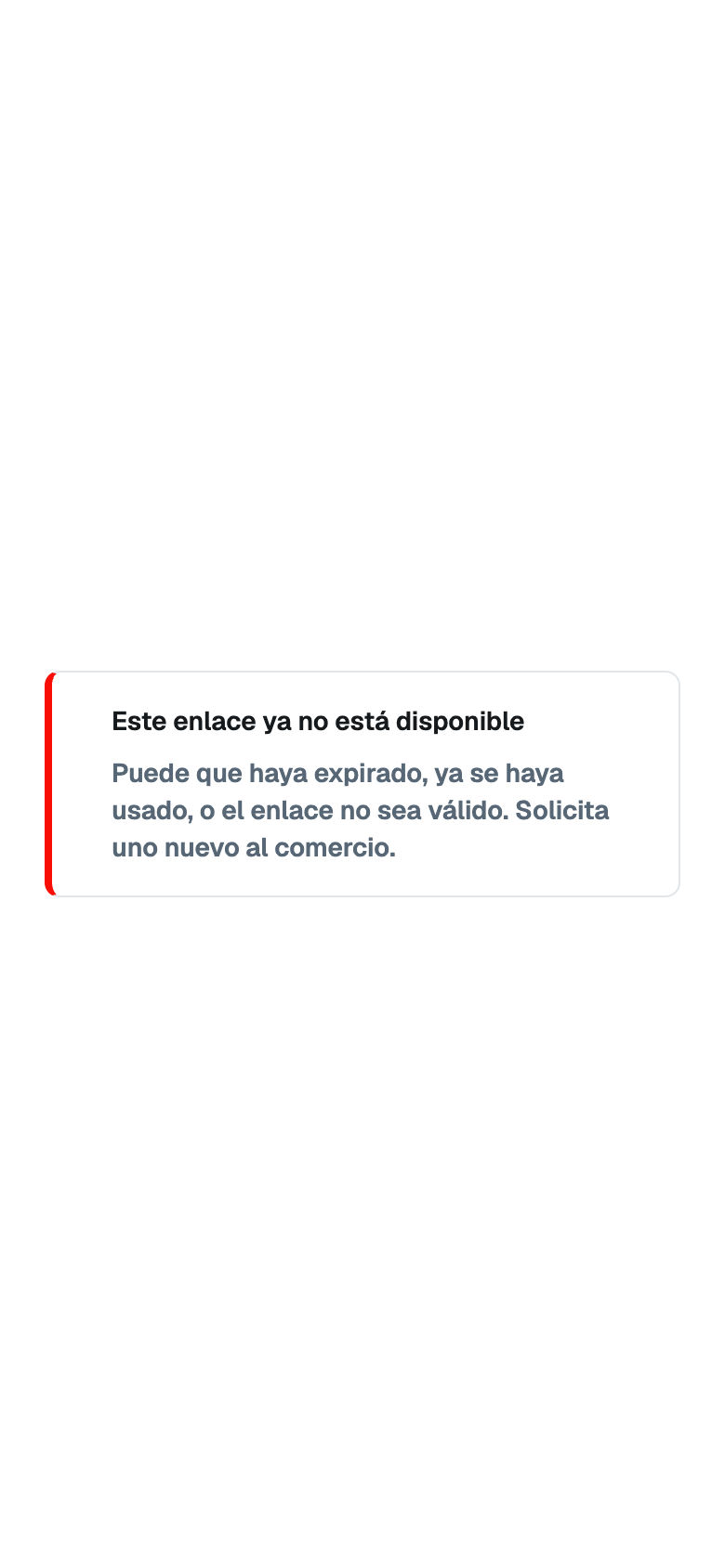
Link unavailable
The widget shows this screen when the link is expired, revoked, already completed, failed, or invalid. For security reasons, the widget shows the same message in every case. Your customer is asked to request a new link from you.
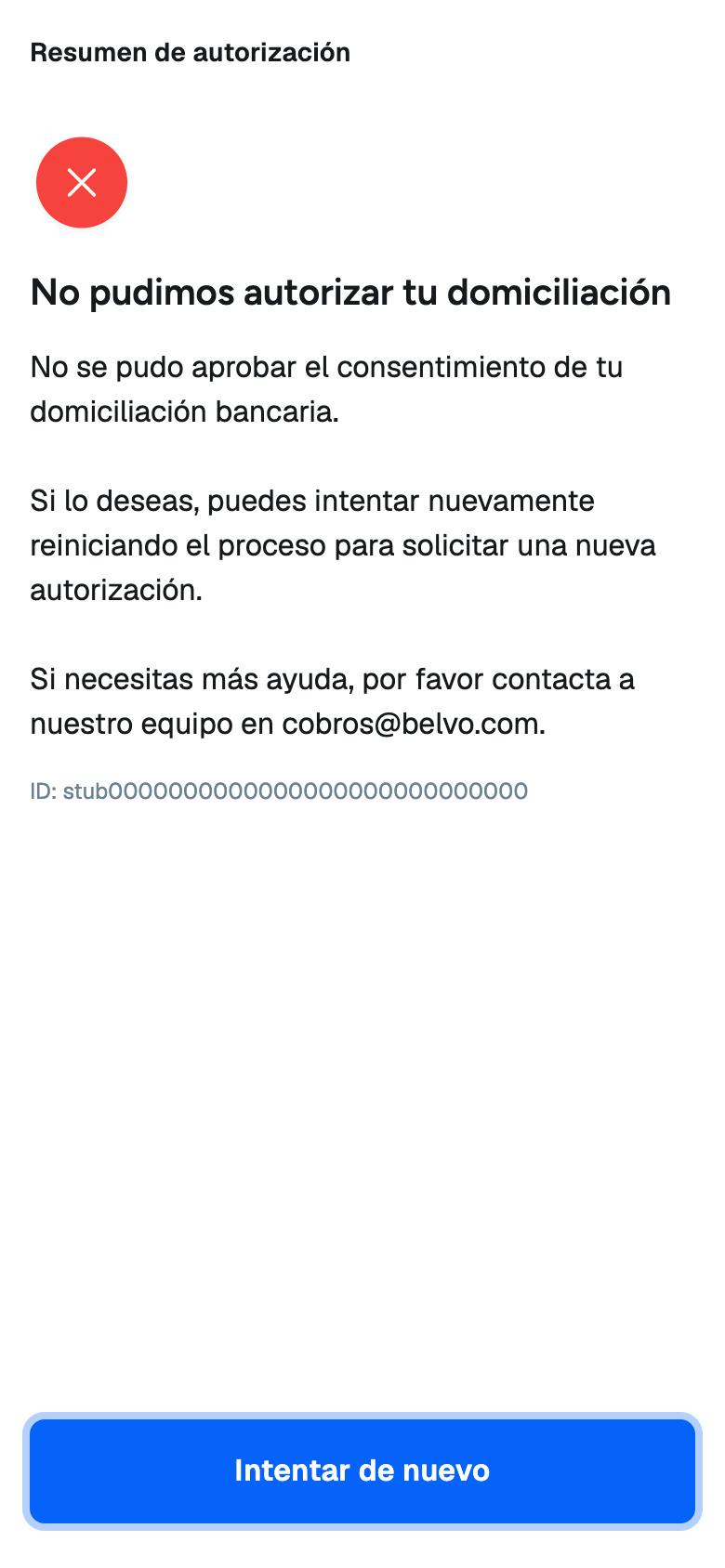
Authorization failed
The widget shows this screen when Belvo can't complete an action while your customer is in the flow, for example, when the account validation failed after they submitted their CLABE. The screen includes an ID that your customer can share with Belvo support at cobros@belvo.com.
If you set a callbackUrl, Belvo redirects your customer to it when they finish or leave the flow. Belvo keeps any query parameters that your URL already has, and adds the following:
status | error | When |
|---|---|---|
completed | Not present | Your customer authorized the direct debit and tapped Cerrar on the confirmation screen. |
cancelled | user_cancelled | Your customer left from the welcome screen. |
cancelled | customer_data_mismatch | Your customer said that the name or ID in the widget is not theirs. |
https://www.your-app.com/direct-debit/return?status=completedThe redirect never includes the link token or any customer data.
Use the redirect to update your UI, but always confirm the result with the API or webhooks before you create payment requests. Anyone can open your callback URL with any parameters, and your customer can close the page without being redirected. Also, ignore any parameter values that you don't recognize, as we may add new ones.
A consent link creates a regular payment method and consent, so you receive the same webhooks as in the Direct Debit Payments via API flow:
consent_updatewithconsent_confirmed: Your customer entered the correct code and the consent is confirmed. Thedetails.idfield is theconsentIdanddetails.paymentMethodIdis the payment method that the link created.payment_method_updatewithpayment_method_registration_successfulorpayment_method_registration_failed: The result of the account validation. Payment methods created by a consent link haveConsentLinkas theirreference.
For complete webhook payloads, see our Payment Webhooks (Mexico) documentation.
To check the status of the link at any time, make a GET /consents/links/{id} call. A completed status means that your customer finished the flow.
curl -i -X GET \
  'https://api.sandbox.directdebit.belvo.com/consents/links/{id}' \
  -H 'api-key-id: YOUR_API_KEY_ID' \
  -H 'api-key-secret: YOUR_API_KEY_SECRET'
You will receive the following response from our API:
{
  "id": "b8e1c2f4-5a6d-4e7f-8a9b-0c1d2e3f4a5b",
  "consentLinkUrl": "https://portal.sandbox.directdebit.belvo.com/consent.html?token=aB3dE6fG9hJ2kL5mN8pQ1rS4",
  "status": "completed",
  "step": "verification",
  "customerId": "0d1a377b-b4c5-4a94-9e2e-83e59d1f6a9c",
  "terms": {
    "chargeType": "RECURRING",
    "chargeAmount": 420,
    "paymentFrequency": "MONTHLY",
    "serviceOrCreditDescription": "Préstamo personal",
    "termDescription": "12 meses",
    "interestRate": "1,0% mensual",
    "numberOfCharges": 12,
    "firstChargeDate": "2026-11-10",
    "isPayrollLinked": false
  },
  "expiresAt": "2026-10-03T15:00:00.000Z",
  "completedAt": "2026-10-01T14:32:18.512Z",
  "callbackUrl": "https://www.your-app.com/direct-debit/return"
}
The response has the same structure as when you created the link. A completed status includes the completedAt timestamp with the ISO-8601 date and time when your customer finished the flow. For details on each field, see the response table in Create a consent link.
To identify the payment method that the link created, use the details.paymentMethodId value from the consent_confirmed webhook. Don't look it up by customer_id alone, as your customer can have more than one payment method. To confirm which customer the payment method belongs to, make a GET Get a payment method's details call and compare its customer with the link's customerId. This only confirms the customer: if you created more than one consent link for the same customer, it doesn't tell you which link created the payment method.
Your customer has authorized the direct debit, and you have a payment method with a confirmed consent. You can now create payment requests for this customer.
In Sandbox, Belvo doesn't send a real $0.01 MXN deposit, so you can't read a code from a bank statement. Instead, you control the result of the flow with the CLABE and the code that your tester enters in the widget. Use the consentLinkUrl that you get from the Sandbox API.
Enter one of the following CLABEs on the personal data and CLABE screen:
| CLABE | Result |
|---|---|
012180000000000015 | The account validation fails. The payment method is failed, the link status changes to failed, and the widget shows an error screen. For details, see Error screens. |
012180000000000028 | The deposit never arrives. The payment method stays in pending_validation, and the link stays in the awaiting_deposit step until it expires. Use it to test the waiting screen. |
| Any other valid CLABE | The deposit arrives immediately. The link moves to the verification step as soon as your tester accepts the authorization, and the widget skips the waiting screen. |
Payment methods that you create with these CLABEs use failed or pending as their reference instead of ConsentLink. The magic CLABEs only work in Sandbox. In Production, Belvo treats them as any other CLABE.
In Sandbox, the verification code is always 123456. Enter any other code to test the wrong code message. Your tester has 3 attempts to enter the correct code.
- Expired: create a link with
"expiresIn": 1and open it after an hour. - Revoked: make a
POST /consents/links/{id}/revokecall, and then open the link.
| Status | Description |
|---|---|
active | The link can be used. Check step to see which screen your customer is on. |
completed | Your customer authorized the direct debit. The consent is confirmed. |
expired | The link reached its expiresAt date before your customer completed it. |
revoked | You revoked the link. |
failed | The account validation failed, for example, because the account holder doesn't match the customer. Create a new link so that your customer can try again with a different account. |
Only active links can be opened. For any other status, the widget shows the Link unavailable screen.
| Step | Description |
|---|---|
bank_account | Your customer hasn't submitted their CLABE yet. |
authorization | Your customer submitted their CLABE and is reviewing the authorization. |
awaiting_deposit | Your customer accepted the authorization and is waiting for the $0.01 MXN deposit. |
verification | The deposit arrived and your customer must enter the code. |
When a link is completed, step keeps the last step your customer was on. Always check status first.
| Request | Description |
|---|---|
GET /consents/links | Lists your consent links, paginated. Supports the page and limit query parameters. |
GET /consents/links/{id} | Gets the details of a consent link. |
POST /consents/links/{id}/revoke | Revokes a consent link. The link can no longer be opened. Revoking a link doesn't change a payment method or consent that the link already created. |
| HTTP status | Description |
|---|---|
400 | The request body is invalid. For example, chargeAmount is a string or less than 1, chargeType is in lowercase, or callbackUrl doesn't use https. |
404 | The customer or consent link doesn't exist or doesn't belong to your account. |